
Wedding Guest List. WedGuest
wediwebEvents
0.00.00 Reviews
- Version
- 1.0.0
- Installs
- 50.00K
- Age Rating
- Everyone
Screenshots

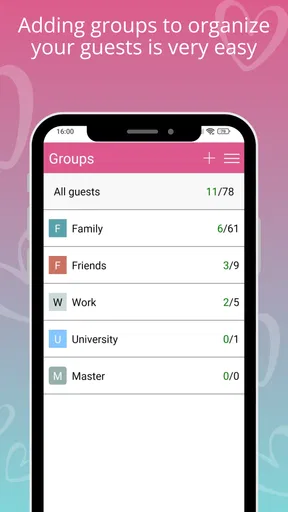
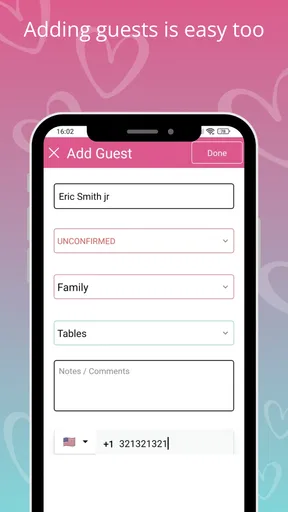
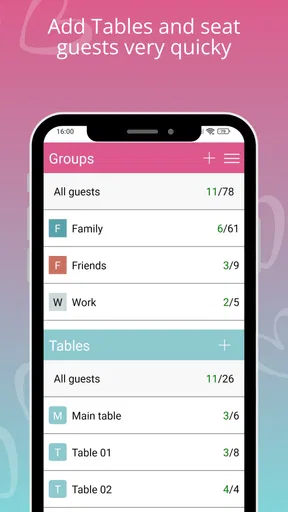
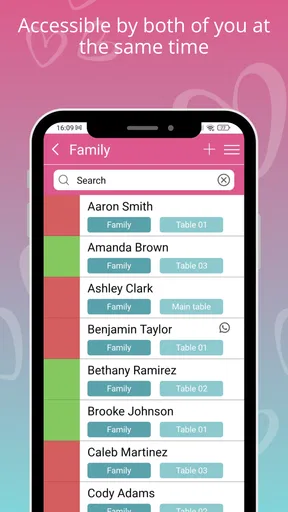
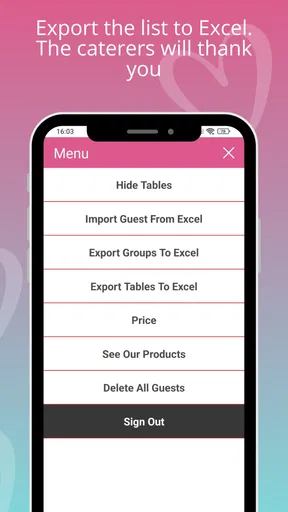
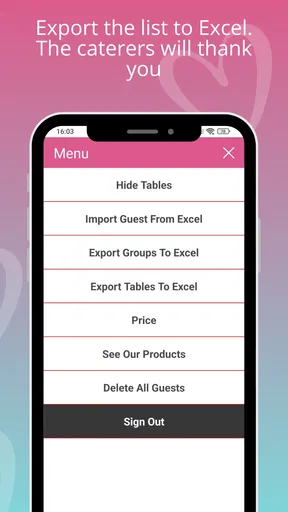
Our Review of Wedding Guest List. WedGuest
 Analysis by Appyee
Wedding guest planning often becomes difficult at the handoff points: one person has a name, another has an RSVP, and a useful dietary note is buried in a message. I find the appeal of WedGuest easiest to understand in that everyday mess. It is an events app from wediweb focused on keeping wedding guests organized, rather than a broad planner meant to manage every part of the celebration. That narrow focus can be useful when the guest list itself is the job that keeps slipping through the cracks.
Where guest-list work tends to snag
The first real challenge is not adding names; it is deciding which version of the list everyone should trust. Couples may begin with a spreadsheet, a phone contact list, and replies scattered across messages. Bringing those details together can reduce duplication, but it still helps to agree on a simple naming habit before entering much information. I would use the same form of each guest’s name throughout and keep household members easy to distinguish, especially where invitations include partners or children.
That small bit of discipline matters later when you are checking responses or reviewing meal notes. A guest recorded under a nickname in one place and a formal name in another can look like two people. If you are importing contacts, I would treat the imported information as a starting point, not a finished guest list: a phone entry may have an old number, an incomplete name, or no indication of who should receive an invitation.
Setup checks before you build the list
Before inviting a partner or planner to help, I would decide who is responsible for making final changes. Shared planning is most useful when everyone understands whether they can edit the master list or should send corrections to one person. Even without complicated rules, agreeing on a single source of truth prevents two people from making conflicting updates while discussing the guest list in parallel.
It is also worth checking a few sample entries before doing a large import or entering a long batch by hand. Add a household with more than one invitee, a person whose response is pending, and someone with a dietary note. Then review the list and confirm that the details are readable in the way you expect. This is a practical safeguard, not a claim about a special testing mode: catching a naming or entry habit early is easier than correcting it after the list has grown.
A realistic planning-day workflow
Picture a couple reviewing invitations after work. One person has heard back from relatives, while the other has a few replies in a message thread. Instead of trying to remember every answer during a later conversation, they can update the guest information while it is fresh, then check the outstanding responses together. Before passing a meal count to a caterer, they can review the relevant notes against the final replies rather than relying on memory.
That kind of routine is where a dedicated guest-list tool can earn its place. I would make short, regular checks rather than wait until the week before the wedding: confirm new replies, resolve unclear plus-one details, and flag any name that needs clarification. The benefit is not that an app can make guests respond on time; it is that the couple can see what still needs human follow-up without reconstructing the whole conversation.
When another approach may fit better
Compared with a general spreadsheet, a wedding-focused app is attractive when you want guest details and response tracking kept together. A spreadsheet may still be the better choice for a couple who already has a carefully maintained system, needs custom columns, or wants to handle the list on a computer in a familiar format. The trade-off is that a spreadsheet relies on the people editing it to preserve structure and avoid overwriting one another’s work.
Likewise, a group chat is convenient for quick coordination but is a poor long-term record: replies can be hard to find, and a decision about one guest can disappear among unrelated messages. WedGuest makes the most sense if you want a dedicated place for wedding attendance details. If your priority is venue bookings, budgets, seating diagrams, or a complete wedding-planning suite, a guest-list app alone is unlikely to replace those tools. I would choose based on the task you need to solve, not assume that one app should run the entire event.
Have you ever tried to organize a wedding guest list and found yourself swimming in a sea of names, addresses, and RSVPs? Trust me, I’ve been there. Thankfully, WedGuest is here to save the day. This app is like having a personal assistant dedicated solely to managing your wedding guests, and if you're knee-deep in wedding planning, this might just be the tool you didn’t know you needed.
Getting Started with Ease
When you first fire up WedGuest, you're greeted with a clean, intuitive interface that makes the daunting task of guest list management feel like a breeze. The app is available on both Android and iOS, so no matter your device preference, you’re covered. Setting up your account is straightforward, and before you know it, you're ready to dive into the features.
A Handy Dashboard
The dashboard is where all the magic happens. You can easily add guests, manage RSVPs, and even keep tabs on meal preferences. The app allows you to import contacts directly from your phone, which is a huge time-saver if you’ve already got some of your guest information stored elsewhere. The ability to categorize guests into different groups, like family, friends, or colleagues, is also super handy.
RSVP Management Made Simple
One of the standout features is the RSVP management. You can send digital invitations directly from the app and track who has responded. This eliminates the need for spreadsheets and endless email chains. Plus, the app sends automatic reminders to guests who haven’t responded yet, so you can avoid those awkward follow-up calls.
Keeping Track of Details
Let’s talk about the little details that really matter. With WedGuest, you can note down meal preferences, dietary restrictions, and plus-one details. This means you can ensure everyone has a great time without any mishaps. Having all this information in one place is invaluable, especially as the big day approaches.
Sharing and Collaborating
If you’re not flying solo with the wedding planning, WedGuest lets you share access with your partner or wedding planner. You can collaborate in real time, making sure everyone is on the same page. This feature is a game-changer for anyone juggling multiple planners or family members involved in the process.
Security and Privacy
In an age where data privacy is paramount, WedGuest doesn’t skimp on security. Your guest information is encrypted, and the app promises not to share your data with third parties. This is a huge relief, because the last thing you need is worrying about guest details getting into the wrong hands.
Practical limits and choosing confidently
For a small guest list managed by one person, even a notes app may feel sufficient. The advantage of WedGuest grows when invitations, replies, and personal details need to stay connected or when more than one person is helping. The counterpoint is that adopting a dedicated tool creates a new place to maintain. If the people planning the wedding will not keep it current, a simple shared document they already use may be more dependable than a richer setup that quickly becomes stale.
There are a few useful questions to settle before relying on any guest-list app. Can the people helping you access it on the devices they actually use? Does the way you intend to invite guests match the workflow available in the app? Are meal and plus-one notes clear enough for whoever will prepare the final count? I would check these points with a small set of entries first and keep a separate copy of essential information until the couple is comfortable with the routine.
If an entry seems missing or a response looks wrong, I would first check whether it was added under another spelling or household member, then ask the person who last handled that reply to confirm what they recorded. For general app trouble, closing and reopening the app, checking that the device has a working connection, and ensuring the app is up to date are sensible first steps. If the issue is a guest who has not replied, that is a people problem rather than a technical one; a polite direct message may be more effective than repeatedly checking the list.
Who should give it a try?
WedGuest is a strong fit for couples who want guest coordination to have its own home, especially if they are combining contact details with RSVP and meal planning. It is also appealing when a partner or planner needs to help keep information current. Someone who is comfortable with a spreadsheet and has no trouble keeping it organized may not gain enough to justify changing habits, while a planner looking for a full event-management system should compare broader tools before settling on this one.
WedGuest is free to install and is rated for Everyone. It was released on June 18, 2024, and its current version is 1.0.0, with Android 7.0 or later required. The app has 10K+ installs and a 0.0 average rating, so I would not treat the rating figure as meaningful user feedback. In-app purchases are listed at $2.99 per item; I would check the purchase details in the app before committing to any paid option, rather than assume a particular feature is included or costs extra.
Final Thoughts
Overall, WedGuest is a must-have for anyone planning a wedding. It takes the stress out of managing your guest list, allowing you to focus on other aspects of your big day. The app is user-friendly, packed with useful features, and it’s clear that a lot of thought went into its design. If you’re in the midst of wedding planning chaos, give WedGuest a try. It might just be the helping hand you need to turn that chaos into calm.
My practical recommendation is to begin with a short, representative list and see whether the way you and your co-planner work fits the app before moving everything over. Keep names consistent, verify imported details, and review important meal or attendance notes before sharing a final count. With that modest setup, WedGuest can be a focused, convenient home for wedding guest coordination; if your existing spreadsheet already does the job reliably, there is no need to switch just for the sake of having another app.
Verdict
Strengths of Wedding Guest List. WedGuest
- User-friendly interface for easy navigation.
- Customizable guest categorization options.
- RSVP tracking and reminders included.
- Integration with popular calendar apps.
- Secure data storage with backup options.
Limitations of Wedding Guest List. WedGuest
- Limited free features; subscription needed.
- Occasional sync issues with other apps.
- No offline mode available.
- Ads can be intrusive for free users.
- Customization options can be overwhelming.
Similar Picks in This Category
View All
Easy Quran Mp3 Audio Offline
Muslim Worldapp4.7

Invitation Maker: Cards & RSVP
Greetings Island4.9

StubHub - Live Event Tickets
StubHub4.3

Fever: Events & Tickets
Fever Labs4.7

Epic Freebie Games Radar
Arioch Pds - Apps & Games4.4

Invitation card Maker, Design
Splendid App Maker4.9
Frequently Asked Questions
What is the main purpose of the WedGuest app?
WedGuest is designed to help couples manage their wedding guest lists efficiently. The app allows users to organize guest information, track RSVPs, and manage seating arrangements. It also offers features for sending digital invitations and receiving responses in real-time, making wedding planning smoother and more organized.
Is WedGuest available on both Android and iOS platforms?
Yes, WedGuest is available for download on both Android and iOS platforms. Users can find the app on the Google Play Store for Android devices and the Apple App Store for iOS devices. This ensures accessibility and convenience for a wide range of smartphone users.
Does WedGuest support integration with other wedding planning tools?
WedGuest offers integration with popular wedding planning tools and platforms. This feature allows users to sync their guest list data with other applications, ensuring a seamless and comprehensive wedding planning experience. Users can check the app’s settings for available integrations and compatibility.
Are there customization options for invitations in the WedGuest app?
Yes, WedGuest provides a variety of customization options for digital invitations. Users can choose from different templates, fonts, and color schemes to match their wedding theme. The app also allows for personalized messages, making it easy to create unique and memorable invitations for guests.
Is there a cost associated with using WedGuest, and are there in-app purchases?
While WedGuest offers a free version with basic features, there are premium options available via in-app purchases. These premium features include advanced customization, enhanced guest management tools, and additional templates. Users can choose the plan that best suits their wedding planning needs and budget.
